
Direct SQL
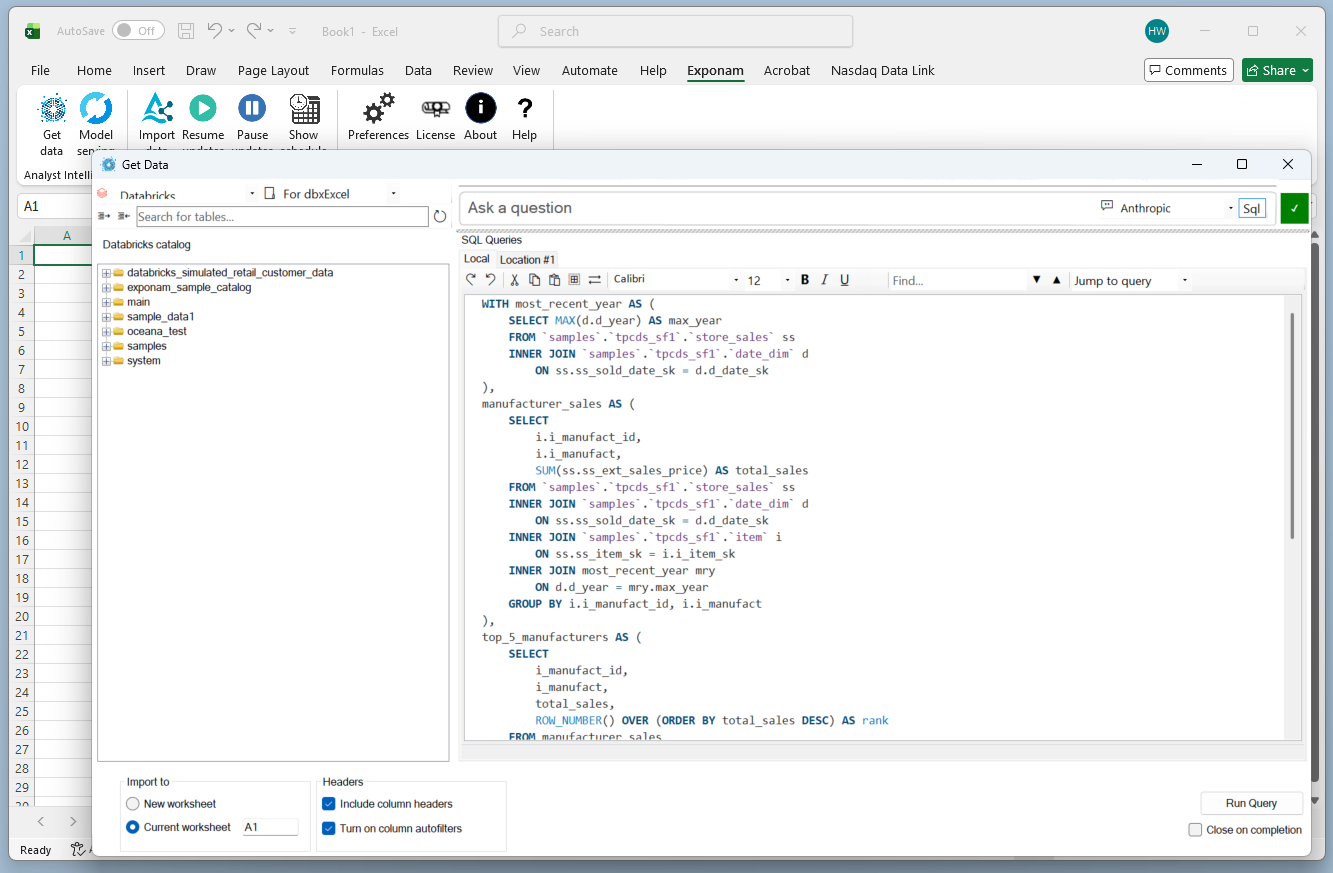
Write the query yourself. Exponam Analyst Intelligence puts a SQL scratchpad inside Excel, runs the query on your Databricks or Snowflake SQL engine, and returns the result to your worksheet. Any SQL the platform supports – joins, window functions, subqueries, aggregations – runs as written.
Write, run, keep
Select the platform and SQL engine, then write in the scratchpad. Double-clicking a table or column in the catalog tree writes a SELECT statement for you to extend. Run the query and the result lands in the worksheet, where it can be refreshed on demand. The scratchpad persists between sessions, and a Jump to control moves between your queries.
Direct SQL
Scratchpad, catalog tree, and shared workspaces.
What you need
Excel for Windows
With the add-in installed from the public install page. Name and email are requested; no payment.
Platform access
A Databricks or Snowflake account with access to a SQL warehouse, using the credentials you already hold.
Nothing further
Direct SQL does not utilize AI translation. Neither local nor commercial model is needed. Connection setup is covered in the Getting started guide.
Individual and shared workspaces
Your workspace
Every user has a private scratchpad. Queries you write stay with you between sessions, organized however you choose, and are visible to no one else.
Shared workspaces
A shared workspace is read-only for its users and maintained by an administrator. When the administrator adds or changes a query, it appears in every member’s scratchpad with no action on their part. Workspaces can be scoped to a team, a group, or a division or however your administrator chooses, so the finance close queries and the operations queries live in different places under different owners.
Any SQL text can be promoted – a query written by hand, or one generated from a natural-language question and reviewed first. The path from an analyst’s scratchpad to a shared workspace runs through the administrator, not through a button in the product.
Nothing reaches a shared workspace that an administrator did not put there.
Cost and governance
What it costs
The query runs on the platform’s SQL engine (Databricks or Snowflake) and is metered the way any query from that warehouse would be. Nothing routes through Exponam. A shared workspace adds no cost of its own; the cost is the query, incurred by whoever runs it.
Governance
Access is governed by the platform. If your credentials cannot see a table in Databricks or Snowflake, the add-in cannot return it to Excel. A shared query runs under the credentials of the person running it, so two users running the same query each see the rows they are entitled to see. Every result is tied to a visible query, so a number in a workbook traces to the SQL that produced it and can be reproduced on demand.
For the perimeter question, our Security Center documents data flow and the NIST SP 800-218 attestation.
Trying it
Install, connect a workspace, and write a query. Results land at up to one million rows per query without a license; enterprise licensing extends the ceiling to ten million rows and adds MSI deployment. The built-in sample Delta Share exercises the visual data builder, not this path. Direct SQL needs a connected workspace. Shared workspaces are set up by an administrator and do not require a license.
The other two paths: Natural-language query and Delta Sharing import.